Meta / Contents
My Remote Agent Experiment: OpenClaw, Honest Results, and a Plot Twist from Anthropic
I set up a dedicated M4 Mac Mini running OpenClaw as a remote coding agent — isolated network, its own Apple ID, Slack interface. The vision was beautiful. The results were not. Then Anthropic announced exactly what I actually needed.
I have a workflow that I love. Before I go to bed, I fire off development tasks to cloud agents — well-defined GitHub issues with requirements, acceptance criteria, and a testing plan. By morning, I've got pull requests waiting for review. It's like having a dev team that works the night shift.
But cloud agents come with subscriptions. Multiple subscriptions. And those monthly bills add up when you're running side projects. So when I heard about OpenClaw — a self-hosted AI assistant you run on your own hardware — the gears started turning.
What if I could replace some of those cloud agent subscriptions with a dedicated machine sitting in my house? Same workflow, same overnight PRs, but on hardware I own. One upfront cost instead of recurring monthly fees.
That was the vision. Here's what actually happened.
The Setup
I went all in. Dedicated M4 Mac Mini, base model — nothing fancy, but more than capable. And because I'd be giving an AI agent access to my code repositories, I treated security like a first-class concern.
Call it paranoia. I call it good practice.
The Mac Mini got its own Apple ID, completely separate from my personal account. I isolated it from my home network entirely — no access to my other devices, no shared resources. The only way I could reach it from my laptop was through Tailscale, which gave me a secure tunnel without exposing anything to the broader network.
For the chat interface, I set up OpenClaw as a Slack app. This was the part that felt most natural. Every software professional lives in Slack or Teams. Being able to message an AI agent the same way I'd message a coworker? That's the right UX for this kind of tool.
I pre-installed Homebrew and pointed OpenClaw to it. From there, watching it work was genuinely impressive. It recognized when it didn't have a capability — needed Node.js? It ran brew install node. Needed Java? brew install openjdk. It felt less like configuring software and more like onboarding a new team member. Here's your laptop, here's the package manager, go set yourself up.
Here's how I envisioned OpenClaw fitting into my existing agent workflow:
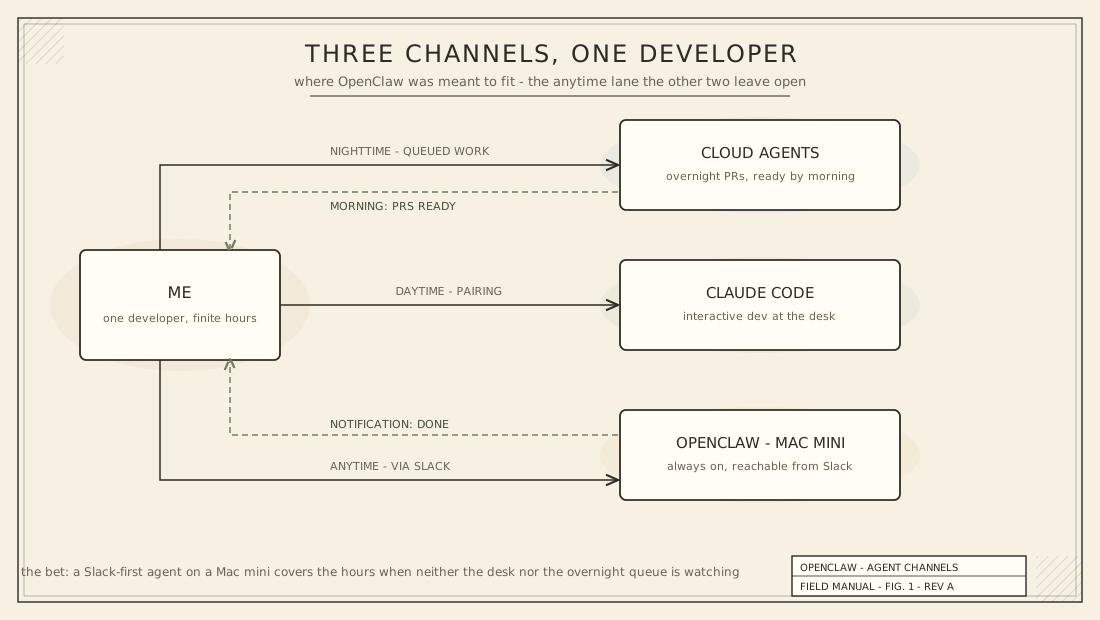
The dream was simple: OpenClaw would slot into the "anytime" tier. Message it from Slack, give it a task, and come back to results. Same pattern as my cloud agents, but running on my own hardware.
Task 1: The Open-Ended Test
For the first test, I kept it loose on purpose. I gave OpenClaw a small feature request with minimal context. I wanted to see how it handled ambiguity — would it ask clarifying questions? Would it explore the codebase and figure out what I meant?
That's what my local agents do. When I give Claude Code a vague request, it reads the project, asks smart questions, and makes a plan before writing a line of code.
OpenClaw didn't ask. It assumed.
The code it delivered didn't work. It didn't follow my instruction to notify me when the task was complete. And when I tried to follow up the next day, it had no memory of our previous conversation. I had to go dig through Slack history to find the old thread and re-establish context.
You know the old saying about what happens when you assume. OpenClaw showed me exactly why that saying exists.
I told myself the problem was me. I'd given it too little context. I hadn't been specific enough. A fair criticism — so I decided to give it a real shot with proper structure.
Task 2: The Structured Attempt
This time, I did everything right. I used my spec-writing process to generate a well-defined GitHub issue — the same kind of ticket I hand off to cloud agents regularly. Requirements, tasks to execute, a testing plan, and acceptance criteria. No ambiguity.
The task was simple. The directions were clear. I told it: work the issue, create a PR, merge it, deploy to the test environment, and test the UI to confirm functionality.
Here's what was supposed to happen versus what actually did:
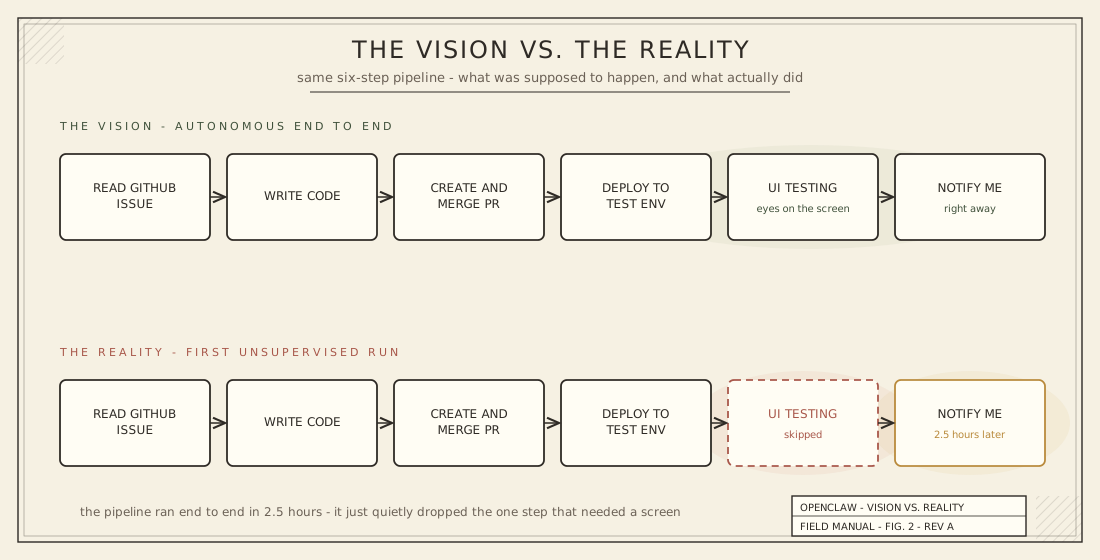
It did complete the code. It did merge the PR and deploy. It even notified me in Slack when it was done. Progress!
But looking closer, the requirements weren't actually satisfied. And the UI testing — the step that would have caught these issues — was skipped entirely. The feature didn't work when I tested it the next morning.
The worst part? The whole thing took approximately 2.5 hours. For a change that touched 7 files and amounted to maybe 50 lines of code.
The next morning, I pulled down the branch and opened Claude Code. Five minutes later, every issue was fixed.
Five minutes. Versus two and a half hours. For the same task, with the same codebase, using the same underlying model technology. The difference wasn't the AI — it was the tooling around it.
The Plot Twist: Remote Control
Here's where the timing gets almost comedic.
The same week I finished setting up my dedicated OpenClaw machine — isolated network, Tailscale tunnel, Slack integration, the works — Anthropic announced Claude Code Remote Control.
Run claude remote-control in your terminal. Get a URL and a QR code. Open it on your phone, tablet, or any browser. Your local Claude Code session is now controllable from anywhere.
That's... exactly what I was trying to build.
No Slack bridge. No isolated network setup. No Tailscale tunnel. Your code stays on your machine, the security model doesn't change, and you get a remote interface to your local coding agent — the same agent that just fixed in five minutes what OpenClaw couldn't get right in two and a half hours.
The connection uses outbound HTTPS only, short-lived credentials, and auto-reconnects if your machine sleeps. It's everything I wanted from the OpenClaw setup, built natively into the tool I already use every day.
Sometimes the universe has a sense of humor.
I'm Not Giving Up (Yet)
I want to be fair to OpenClaw. It's an ambitious project, and what it does well — the self-setup, the Slack integration, the general "personal assistant" vibe — is genuinely cool. Watching it install its own development tools and reason about what it needed was impressive. The experience of chatting with it felt like working with another human.
But for software development tasks? It's not there yet. The mismanagement of persistent memory, the inability to follow multi-step instructions reliably, and the raw execution time make it impractical for the kind of coding work I need done.
That said, I'm not shelving the Mac Mini. There's still an opportunity here that I want to explore: dedicated test automation. To be honest, full QA is a bit of a gap in my current workflow. Instead of asking OpenClaw to write code, what if I used it to run regression tests — including UI testing — against every commit? A dedicated QA agent rather than a coding agent.
This is a problem I need to solve...but first, I have some things to learn first before heading down that path. Stay tuned.
The Right Tool for the Right Job
If there's a lesson in this experiment, it's one I keep relearning: the right tool for the right job matters more than the coolest tool for any job. When you have a sledgehammer like Openclaw, every problem looks like a nail.
My agent ecosystem is clearer now than it was a week ago:
- Cloud agents for overnight, fire-and-forget development tasks — wake up to PRs
- Claude Code locally for interactive development — the daily workhorse
- Remote Control for mobile flexibility — steer local sessions from anywhere
- OpenClaw — TBD, but probably not coding
The self-hosted agent dream isn't dead. It just needs to find the right problem to solve. And for coding tasks, purpose-built tools with deep codebase understanding, persistent memory, and tight feedback loops still win by a mile.
I'll keep experimenting. That's the whole point.
–Jeremy